Opus vs MP3 for YouTube Audio: Which Format Actually Wins?
You paste a YouTube link into a converter, pick MP3, and assume you got the best possible sound. You didn’t. YouTube never stores audio as MP3 in the first place — it stores Opus or AAC. Converting to MP3 adds an extra compression step that the original file never needed, and that step can quietly cost you quality.
What Format Does YouTube Actually Use?
YouTube’s standard audio streams come in two native codecs: AAC, wrapped in an MP4 container, and Opus, wrapped in a WebM container. Neither one is MP3. When a converter offers you an MP3 download, it takes the Opus or AAC stream and re-encodes it into MP3.
That re-encoding step matters. Every lossy codec throws away audio data it decides you won’t miss. Compress once, and you lose a little. Compress a file that’s already been compressed, and you lose more, because the second encoder has to work from data the first encoder already stripped down.
Opus vs MP3: The Real Quality Difference
Opus is a newer, open codec built by the Xiph.Org Foundation and standardized by the Internet Engineering Task Force. It combines a speech-focused mode with a music-focused mode into a single format, enabling it to perform well across very different types of audio.
The organization behind Opus has published its own listening-test results, and they’re worth looking at directly instead of trusting a bitrate rule of thumb. <cite index=”69-1″>In blind ABC/HR listening tests on 48 kHz stereo music, Opus at 96 kb/s outperformed an MP3 encoder running at 136 kb/s.</cite> That test used real listeners comparing real files, not a marketing estimate.
Google’s own audio team ran a separate round of listening tests covering narrowband speech, wideband speech, and stereo music, adding another independent data point beyond the Xiph.Org results. The pattern across these tests stays consistent: Opus reaches a given quality level at a meaningfully lower bitrate than MP3 needs to reach the same level.
This doesn’t mean MP3 sounds bad. At high bitrates, most listeners struggle to tell any lossy codec apart from the source. It means Opus gets you there with a smaller file, which is exactly what YouTube — a platform that streams billions of hours of audio — needs.
Why File Size Follows Quality
Because Opus needs fewer bits to sound the same, it produces smaller files at matching quality. A podcast episode or an audio-heavy stream costs less bandwidth to deliver in Opus than in MP3 at an equivalent listening experience.
For your own downloads, this plays out simply. If you extract audio in Opus instead of converting to MP3, you keep the format YouTube actually used, skip the extra compression pass, and end up with a smaller file that sounds at least as good — often better.
Where Opus Falls Short
Opus isn’t the right answer everywhere, and pretending otherwise wouldn’t be honest. Its biggest weakness is device support outside modern software.
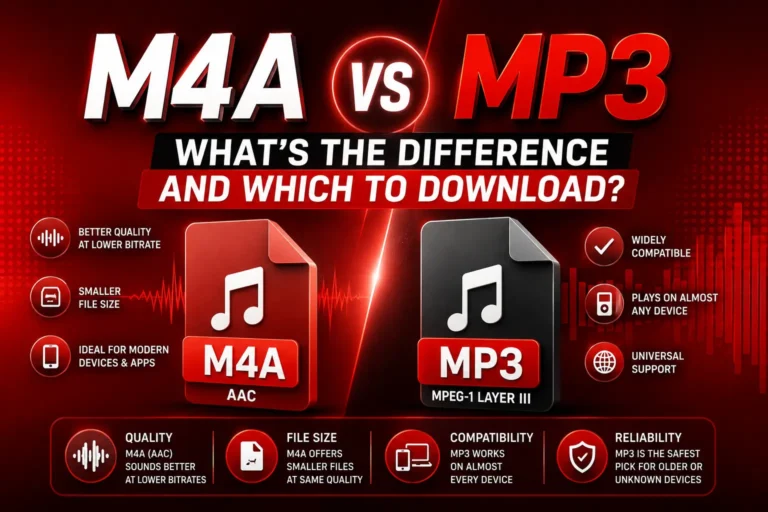
Many older car stereos, basic MP3 players, and some legacy Bluetooth speakers can’t decode Opus files at all. MP3 has been around since the 1990s, and virtually every audio device built since then can play it without issue. If you need a file to work on a specific piece of older hardware, MP3 remains the dependable choice.
There’s also a real cost to converting an already-lossy MP3 back into Opus. Re-encoding a compressed file into a different lossy format doesn’t recover the detail the first encoder discarded — it just adds a second round of loss on top. Start from the original YouTube stream, not from an MP3 you already made.
Which Should You Choose?
The decision comes down to where you plan to listen.
Choose Opus when:
- You’re playing the file on a phone, laptop, or modern app
- You want the smallest file size without a quality trade-off
- You’re keeping the audio in a browser, media player, or streaming setup you control
Choose MP3 when:
- You need the file to play on an older car stereo or dedicated MP3 player
- You’re sharing the file with someone whose device you don’t control
- Compatibility matters more than squeezing out the smallest possible file
Either works well when:
- You’re listening on a modern desktop media player like VLC, which handles both formats natively
How to Get the Best Audio from YouTube
Whichever format you land on, two habits protect the quality you actually get.
First, avoid stacking conversions. Extract directly from the YouTube source once, rather than converting MP3 to Opus or Opus to MP3 after the fact. Each additional lossy pass introduces artifacts that can’t be undone.
Second, match your bitrate to the content instead of maxing it out by default. Spoken-word audio like lectures and podcasts needs far less data than dense music to sound clear. Our guide to choosing MP3 settings for music, speech, and podcasts breaks down which bitrate fits which use case.
FAQs
Does YouTube use MP3 for audio?
No. YouTube stores audio in AAC or Opus. MP3 only appears when a converter re-encodes the original stream into that format.
Is Opus better quality than MP3?
At matching bitrates, yes. Published listening tests from the Opus development team show Opus at 96 kb/s beating MP3 at 136 kb/s in blind comparisons.
Will Opus files play on my car stereo?
It depends on the age of the stereo. Many units made before Opus became common can’t decode it. MP3 remains the safer choice for older hardware.
Should I convert MP3 back to Opus for better quality?
No. Once YouTube’s original stream is compressed to MP3, converting it to Opus can’t recover the lost detail. Always extract from the source.
Which format has smaller file sizes?
Opus, at the same perceived quality level. It needs fewer bits than MP3 to sound comparable, which is part of why YouTube uses it.
The Bottom Line
MP3 isn’t a bad format — it’s just not the format YouTube uses natively, and it’s not the most efficient option available today. Opus delivers comparable or better quality at a smaller file size, backed by published listening tests rather than assumptions. MP3 earns its keep through one thing Opus can’t match: playback on nearly any device made in the last twenty-five years.
Pick based on where the file needs to play, not on habit. For anything staying on a modern phone or computer, Opus is the stronger technical choice. For anything headed to an older stereo or an unfamiliar device, MP3 stays the safer bet.